
Isolation model
The wrapper’s isolation model is a four-level hierarchy. Each level narrows what a caller can see one notch further than the level above it. Understanding these four levels — and, crucially, which of them is enforced by a token rather than by a shared key — is the key to the whole system.
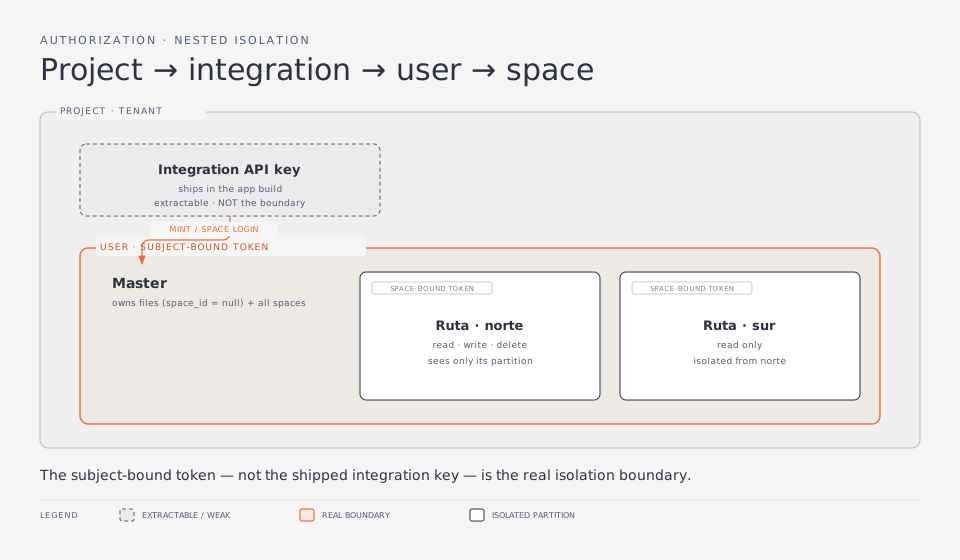
The four levels
Section titled “The four levels”1. Project — the tenant boundary
Section titled “1. Project — the tenant boundary”A project is a tenant. Everything else belongs to exactly one project, and
the project id is the outermost partition: no query ever crosses it. A project is
created by an admin and receives a PROJECT_API_KEY (returned exactly once). The
project owner uses that key — or a portal login (a project-role JWT) — to manage
the project: keys, integrations, plans, users, and spaces.
Every authenticated request resolves to a project_id, and that id is injected
into the request context and folded into every database query. This is the
baseline multi-tenant guarantee and it is unconditional.
2. Integration — which app is calling
Section titled “2. Integration — which app is calling”An integration represents a client application that talks to the wrapper on
behalf of the project: a mobile app, a web front-end, an internal tool. Each
integration has its own INTEGRATION_API_KEY, its own declared scopes, and
its own rate-limit / CORS policy.
The critical property: an integration key identifies an app, not a user. It answers “I am the Liquida Pro mobile app” — nothing more. It is deliberately not an isolation boundary between the app’s own users, because the key lives inside the app build and is extractable.
3. User (“Master”) — the end-user identity
Section titled “3. User (“Master”) — the end-user identity”A user is an end-user of the integration’s app. In the Liquida domain this is
a Master: a paying customer who owns files and manages a set of workspaces.
Users are provisioned by the integration (or the project owner) and carry both an
internal id and an integrator-supplied external_id.
A user becomes a caller by logging in: the integration exchanges its key for a short-lived user token bound to that user’s id. From that point, the token — not the integration key — is what the user’s client presents, and it can only ever act on that one user’s data.
4. Space (“Ruta”) — one level below the user
Section titled “4. Space (“Ruta”) — one level below the user”A space (domain term: Ruta) is an isolated storage partition underneath a Master. A Master can own many Rutas, and each Ruta is blind to the others. This models the Liquida case where one Master (e.g. a company) has many field workers, each of whom must see only their own workspace.
- A file with
space_id IS NULLis a Master-level file, owned by the user directly. - A file with
space_id = Xbelongs to RutaX.
Visibility follows the hierarchy:
| Caller | Sees |
|---|---|
| Project / integration key | project-wide (all users, all spaces) |
| User (Master) token | own files (space_id IS NULL) plus all its spaces’ files |
| Space (Ruta) token | only files in its bound space_id |
A Ruta is also a login identity: a worker signs in with the Ruta’s own
external_id + password, and the wrapper mints a space token bound to that
single space. A space may be active on one device at a time (last-wins).
Why the token is subject-bound, not the key
Section titled “Why the token is subject-bound, not the key”This is the security crux of the entire design.
Both integration keys — the Master app’s and the Pro app’s — ship inside app builds. A key baked into a mobile build can be pulled out of the APK in minutes. If that key were the isolation boundary, extracting it would hand the attacker every user’s and every workspace’s files across the tenant.
So the wrapper makes the login the boundary instead:
- Master login mints a
usertoken (subject = the Master’suser_id, no space). - Ruta login mints a
spacetoken (bound to a singlespace_id; its owner user is carried along so the subject guard still applies).
The token is:
- Short-lived — user tokens default to 15 minutes (
USER_TOKEN_TTL_SECONDS), space tokens to 1 day (SPACE_TOKEN_TTL_SECONDS); the integration re-mints. - Subject-pinned — a hard guard (not a warn-only check) rejects any request that targets a different user or space, no matter what scopes the token holds.
- Revocable — every token carries a
jti; revoking blocklists it.
Minting authority is itself partitioned as defense in depth: the Pro integration can mint space tokens only, the Master integration mints user tokens. A stolen Pro key can therefore never mint a Master token — the worst it can do is what the Pro app itself was allowed to do.
How this maps to the code
Section titled “How this maps to the code”| Concept | Where it lives |
|---|---|
| Unified caller identity | apps/api/src/lib/principal.ts (Principal, subjectUserId, spaceId) |
| Session roles | apps/api/src/lib/session.ts (project / user / space) |
| Subject pinning | apps/api/src/middleware/subject-guard.ts |
| Space visibility filter | file query keyed on principal.spaceId in apps/api/src/routes/files.ts |
spaces table + files.space_id |
apps/api/src/db/schema/spaces.ts, .../files.ts |
The design rationale is captured in
docs/proposals/scoped-spaces-isolation.md and its predecessor
docs/proposals/per-user-access-isolation.md.
Next: see how each of these levels becomes a distinct authorization axis with its own guard in Authorization axes.